


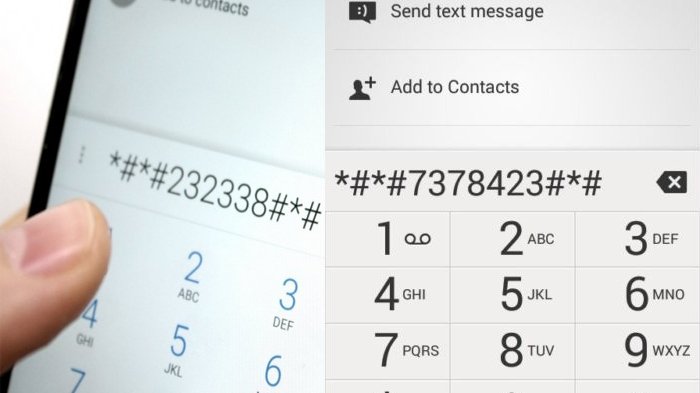
Download Aplikasi Handphone Android Terbaru – sekarang ini hp sudah banyak yang memakai sistem operasi android, pastinya akan terasa cangiih dan nyaman dalam menggunakannya, kami baru saja menukan beberapa pengecekan untuk aplikasi hp yang memakai sitem operasi android, di bawah ini adalah kodenya :
Information about phone and battery
* # * # 4636 # * # *
This suggests the following four on-screen menu:
* Phone Information
* Battery information
* History of Batteries
* Usage Statistics
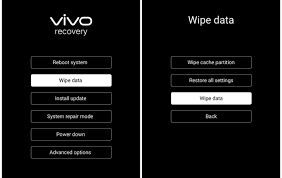
Reset the data such as origin
* # * # 7780 # * # *
This will remove the following:
* Google account settings are stored in your phone
* System and application data and settings
* Applications that were Download
and will NOT delete:
* Current software systems and application packages
* Card SD files such as photos, music files, etc.
Note: Once you give this code, you get a prompt on the screen asking you to click on the button “Reset Phone”. So you get a chance to cancel your surgery.
Format the original manufacturer
* 2767 * 3855 #
Think before you give this code. This will delete all files and settings, including internal memory storage. This will also reinstall the phone’s firmware.
Note: Once you give this code, there is no way to cancel the operation unless you remove the battery from the phone. So think twice before giving this code.
Information about camera phones
* # * # 34971539 # * # *
This code shows the four following menu:
* Update the firmware of the camera in the picture (Do not try this option)
* Update the camera firmware in the SD card
* Get the camera firmware version
* Get count of firmware updates
WARNING: Do not use the first option is declared, the camera phone will stop working and you will need to take your phone to a service / shop to reinstall the firmware of the camera.
This code can be used to change the “End Call / Power”
* # * # 7594 # * # *
This code can be used to change the “End Call / Power” action on your phone keypad. So the default, if you press the button for a moment, it will show a screen that asks you to select options from the Silent mode, and Turn off Airplane mode phone.
You can change the action using this code. You can activate this power directly from the button so you do not have to waste your time in choosing the option.
Open a screen where copy files
* # * # 273 283 * 255 * 663 282 *#*#*
Service mode log
* # * # 197328640 # * # *
You can run various tests and setting changes in service mode.
Test Code: WLAN, GPS and Bluetooth
* # * # 232339 # * # * – test WLAN
* # * # 526 # * # * – test WLAN
* # * # 528 # * # * – test WLAN (Use the “Menu” to launch a variety of test)
* # * # 232338 # * # * – Displays the MAC address of the WiFi
* # * # 1472365 # * # * – GPS test
* # * # 1575 # * # * – another test GPS.
* # * # 232331 # * # * – Bluetooth test
* # * # 232337 # * # – Displays the Bluetooth address
Launch GTalk Service Monitor
* # * # 8255 # * # *
Code to get the firmware version information:
* # * # 4986 * 2650468 # * # * – PDA, Phone, H / W, RFCallDate
* # * # 1234 # * # * – PDA and Phone
* # * # 1111 # * # * – FTA SW Version
* # * # 2222 # * # * – FTA HW Version
* # * # 44336 # * # * – PDA, Phone, CSC, Build Time, Changelist number.
The code to launch various Factory Tests:
* # * # 0283 # * # * – Loopback packet
* # * # 0 *#*#* – LCD test
* # * # 0673 # * # * or * # * # 0289 # * # * – Melody test
* # * # 0842 # * # * – Device tests (Vibration, and Backlight test)
* # * # 2663 # * # * – Touch screen version
* # * # 2664 # * # * – Touch screen test
* # * # 0588 # * # * – Proximity sensor test
* # * # 3264 # * # * – RAM version
Selamat Menikati kode aplikasi dari sistem operasi android terbaru
Berikut ini ada 39 kode smartphone yang bisa Anda gunakan untuk mengetes dan mengetahui kondisi mesin smartphone Anda.
1. Mengecek IMEI *#06#
2. Mengetes RAM memori *#*#3264#*#*
3. Mengecek Versi FTA SW *#*#1111#*#*
4. Mengecek versi FTA HW *#*#2222#*#*
5. Mengecek layar dan touchscreen *#*#2663#*#*
6. Mengetes Bluetooth *#*#232331#*#*
7. Mengetes kode dan alamat Bluetooth #*#*232337#*#
8. Mengecek GPS *#*#1472365#*#*
9. Cara lain mengecek GPS *#*#1575#*#*
10. Tes WiFi/Wireless dan LAN *#*#23339#*#* atau *#*#528#*#* atau *#*#526#*#*
11. Tes IP atau alamat WiFi *#*#232338#*#*
12. Tes getas dan Back-Light perangkat *#*#0842#*#*
13. Tes proximity sensor *#*#0588#*#*
14. Mengecek kondisi Touchscreen *#*#2663#*#*
15. Tes suara audio *#*#0289#*#* atau *#*#0673#*#*
16. Membuka servis mode *#*#197328640#*#*
17. Menyembunyikan menu (Motorola) ##7764726
18. Menguji ponsel *#*#7262626#*#*
19. Format smartphone *2767*3855#
20. Untuk restore dan pengaturan factory *#*#7780#*#*
21. Membuat backup file dan media *#*#273282*255*663282*#*#*
22. Mengetahui informasi perangkat *#*#4636#*#*
23. Mengetahui informasi detail kamera *#*#34971539#*#*
24. Mengetahui informasi software dan hardware*#*#12580*#369#
25. Kontrol menu untuk jaringan 3G HSDPA/HSUPA *#301279#
26. Mulai untuk memantau GTalk *#*#8255#*#*
27. Mendapatkan PDA telephone H/W dan RF data panggilan *#*#4986*2650468#*#*
28. Mengetahui waktu pembuatan dan mengganti list nomor *#*#44336#*#*
29 Mengetes paket Loopback *#*#0283#*#*
30. Mengetes layar LCD *#*#0*#*#*
31. Masuk ke servis menu *#0*#
32. Konfigurasi diagnostik *#9090#
33. Kontrol masuk USB *#872564#
34. Sistem dump mode *#9900#
35. Melihat Phone Lock status *#7465625#
36. Emergency dan unlock PUK kode **05**#
37. Mengaktifkan mode panggilan suara *#*#8351#*#*
38. Menonaktifkan mode panggilan suara *#*#8350#*#*
39. Mengubah fungsi tombol power *#*#7594#*#*
Namun beberapa di antaranya mungkin tak bisa diakses di beberapa merek ponsel tertentu karena sistem keamanan yang berbeda-beda.










:strip_icc():format(jpeg)/kly-media-production/avatars/422984/original/013437800_1544510972-aku.jpg)
Excellent goods from you, man. I’ve understand your stuff previous
to and you’re just too excellent. I actually
like what you’ve acquired here, certainly like what you are
stating and the way in which you say it. You make it entertaining and
you still take care of to keep it wise. I can not wait to read far more from
you. This is really a tremendous web site.
Wow, incredible weblog structure! How long have you been running a blog for?
you made blogging glance easy. The overall look of your site is wonderful, let alone the content!
No matter if some one searches for his required thing,
thus he/she wants to be available that in detail, therefore that thing is maintained over here.
Aw, this was a really good post. Taking a few minutes and actual effort to generate a top notch article… but what can I say… I put things off a whole lot and don’t seem to get
nearly anything done.
Aw, this was an extremely nice post. Taking a few minutes and actual
effort to generate a top notch article… but what can I say… I hesitate a
whole lot and never seem to get anything done.
Wow, that’s what I was exploring for, what a data! present here at this web site, thanks admin of this web site.
Useful information. Lucky me I discovered your website accidentally, and I’m shocked why this
accident did not happened in advance! I bookmarked it.
Very good article. I’m going through a few of these issues as well..
I have been surfing online more than 3 hours today, yet I never found any
interesting article like yours. It’s pretty worth enough for me.
In my view, if all site owners and bloggers made good content
as you did, the net will be much more useful than ever before.
I’m not sure exactly why but this web site is
loading very slow for me. Is anyone else having this problem
or is it a issue on my end? I’ll check back later and see if the problem still exists.